What really matters when you compare laptop specs (laptop specs comparison)
tech
By The Yield Witness • 29 Nov 2025 • 4 min read

Ever stared at two laptops side-by-side — both “quad-core i5,” both “512 GB storage,” both “8 GB RAM” — yet one feels sluggish and the other flies? Yeah. I’ve been there. And that’s when I realized: spec sheets don’t tell the full story.
If you pick without context, you’ll end up with a machine that boots slowly, lags when multitasking or drains its battery mid-lecture. That’s frustrating — and avoidable.
Let me walk you through what really counts when you’re doing a laptop specs comparison. I’ll help you look past the numbers and ask better questions.
If you pick without context, you’ll end up with a machine that boots slowly, lags when multitasking or drains its battery mid-lecture. That’s frustrating — and avoidable.
Let me walk you through what really counts when you’re doing a laptop specs comparison. I’ll help you look past the numbers and ask better questions.
Why CPU numbers alone rarely tell the whole story
Thinking a “Core i7” or “Ryzen 7” CPU means peak performance? That’s too simple. What matters more is configuration, heat management, and what you actually do with the laptop.
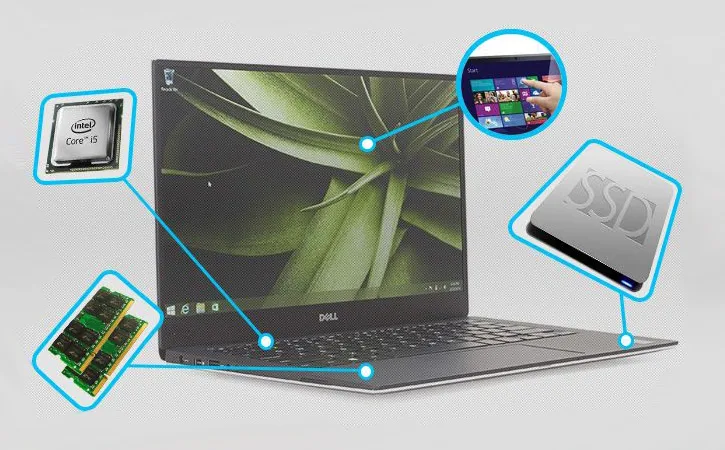
CPU power draws (often shown as TDP) shape real performance — especially on laptops. A CPU with high TDP can crunch heavy tasks, yes, but it heats up the system and drains battery faster. If the chassis cooling is weak, you’ll hit thermal throttling. MakeUseOf
So when you compare two laptops both listing “Intel i7” — check if one is a power-hungry H-series, the other a low-power U-series. One might run hot, fans roaring, batteries draining; the other stays cool, efficient.
If you’re mostly writing, browsing, coding — picking a mid-range CPU (e.g. i5 / Ryzen 5) with good cooling can beat a “top-tier” CPU that’s poorly cooled. That’s a smarter tradeoff.
CPU power draws (often shown as TDP) shape real performance — especially on laptops. A CPU with high TDP can crunch heavy tasks, yes, but it heats up the system and drains battery faster. If the chassis cooling is weak, you’ll hit thermal throttling. MakeUseOf
So when you compare two laptops both listing “Intel i7” — check if one is a power-hungry H-series, the other a low-power U-series. One might run hot, fans roaring, batteries draining; the other stays cool, efficient.
If you’re mostly writing, browsing, coding — picking a mid-range CPU (e.g. i5 / Ryzen 5) with good cooling can beat a “top-tier” CPU that’s poorly cooled. That’s a smarter tradeoff.
Why RAM and storage often weigh more than flashy CPU claims
Ever opened 15 tabs, a few apps, and everything slowed down? That’s usually low RAM or slow storage messing things up.
For RAM: 8 GB used to be fine. Nowadays, 16 GB feels like the realistic starting point for smooth multitasking — browsers, video calls, IDEs all eat memory fast. TechRadar
Storage: skip HDD as your main drive. SSD — ideally NVMe — matters more than sheer size. A 512 GB SSD boots your system in seconds, loads apps fast, handles file transfers swiftly. HDDs feel sluggish and can fail under stress. Techstore Kenya
If your workflow is heavy — editing video, coding, running virtual machines — prioritize SSD + 16 GB+ RAM over chasing the “fastest CPU.”
For RAM: 8 GB used to be fine. Nowadays, 16 GB feels like the realistic starting point for smooth multitasking — browsers, video calls, IDEs all eat memory fast. TechRadar
Storage: skip HDD as your main drive. SSD — ideally NVMe — matters more than sheer size. A 512 GB SSD boots your system in seconds, loads apps fast, handles file transfers swiftly. HDDs feel sluggish and can fail under stress. Techstore Kenya
If your workflow is heavy — editing video, coding, running virtual machines — prioritize SSD + 16 GB+ RAM over chasing the “fastest CPU.”
Displays, battery, portability: aspects often overlooked
A sharp CPU + RAM + SSD stack means little if you spend hours staring at a dim screen in bad light or charging every few hours.
When you compare specs, check for:
If you’re a student, remote worker, or creative on the go — these “soft” specs often matter more than raw compute power.
When you compare specs, check for:
- At least Full HD (1920×1080) resolution — anything lower can feel cramped. Laptop Mag
- If you care about battery life and mobility — lighter chassis, efficient CPU, and SSD will stretch battery hours. Some displays (touch or 4K) drain battery faster. TechNave
- Build quality and cooling layout: a flimsy hinge or poor airflow can ruin the user experience long-term. Some Reddit users call this “the hidden spec that matters most.” Reddit
If you’re a student, remote worker, or creative on the go — these “soft” specs often matter more than raw compute power.
My myth-busting take: you don’t always need “top specs” for smooth performance
You don’t need a bleeding-edge CPU, 32 GB RAM, 1 TB SSD to get a laptop that lasts and performs.
Truth is: for most everyday tasks — browsing, writing, programming, light content creation — a well-balanced mid-tier laptop (SSD + 16 GB RAM + modest CPU) performs better than an “over-spec’d” machine that sacrifices battery or thermal comfort.
Over-investing in CPU or storage you don’t need is common mistakes. Balance matters — think of a laptop as a team, not a solo star.
Truth is: for most everyday tasks — browsing, writing, programming, light content creation — a well-balanced mid-tier laptop (SSD + 16 GB RAM + modest CPU) performs better than an “over-spec’d” machine that sacrifices battery or thermal comfort.
Over-investing in CPU or storage you don’t need is common mistakes. Balance matters — think of a laptop as a team, not a solo star.
How to compare realistically before you buy

Here’s what I do when comparing two laptops:
That method weeds out hype and shows what you’ll actually use years down the line.
- Check RAM type and size (preferably 16 GB DDR4/DDR5 if multitasking).
- Ensure primary drive is SSD — ideally NVMe.
- Look at CPU type & TDP (efficiency vs power tradeoff).
- Consider screen resolution and panel type for comfort.
- Estimate battery/portability vs performance, especially if you travel.
- Check upgrade possibilities: can you swap SSD or expand RAM later?
That method weeds out hype and shows what you’ll actually use years down the line.
What I wish more buyers knew before spec’ing out a laptop
When I bought my first personal laptop back in 2015, I went for top-of-line CPU and maximum storage. It was loud, hot, battery died fast — and I barely did heavy work.
Looking back, a lighter, balanced machine would’ve done better for me. I’d have saved money, endured less heat, and still gotten work done — often faster thanks to SSD + sufficient RAM.
If you could do it over: choose balance over maximum. Prioritize what you use every day — not what sounds impressive on a spec sheet.
Looking back, a lighter, balanced machine would’ve done better for me. I’d have saved money, endured less heat, and still gotten work done — often faster thanks to SSD + sufficient RAM.
If you could do it over: choose balance over maximum. Prioritize what you use every day — not what sounds impressive on a spec sheet.
When you actually compare laptops, think of them like tools — not marketing statements.
Ask: What will I really do with it? Will I code, write, browse, design? Or render video, compile heavy projects, game?
Buy what fits your life, not what the ads push.
Ask: What will I really do with it? Will I code, write, browse, design? Or render video, compile heavy projects, game?
Buy what fits your life, not what the ads push.
Often no. The extra RAM makes a bigger difference in multitasking and day-to-day responsiveness than bumping CPU alone — especially if you don’t need heavy CPU tasks.
Yes. A Full HD screen (1920×1080) drastically improves comfort and usability compared to older low-res displays. For writing, coding, browsing, or design — readability and clarity make a big difference.
Absolutely. Laptops with user-replaceable RAM or extra SSD slots stay relevant longer. Soldered RAM or fixed storage means what you buy is what you get — forever.
Not necessarily. If they have SSD storage, sufficient RAM (16 GB ideal), and balanced CPU — many budget or mid-range laptops deliver great everyday performance with less heat, better battery life, and lower cost.
Sources
- MakeUseOf, “7 Features and specs to consider when buying a high-performance laptop”
- TechStore Kenya, “7 Things to Look for When Buying a Laptop in Kenya (2025)”
- Techmall NG, “Why SSD and RAM matter more than CPU for your business laptops”
- Laptop Mag, “Laptop configuration guide”

Related Articles
No related posts